
Description
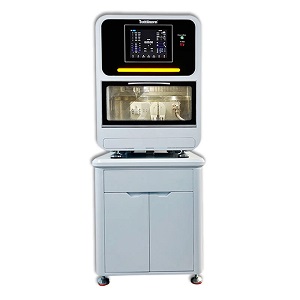
Designed to fit all shapes of thermoplastic sheets, this versatile device is perfect for a wide range of clinical applications. From creating mouthguards to fabricating custom trays and aligners, our dental vacuum former is an essential tool for any dental practice.
Custom Orthodontic Appliances Made Easy: Our dental vacuum former allows you to set the precise heating time, vacuum time, and vacuum power intensity, giving you complete control over the manufacturing process. This level of customization enables you to produce unique, high-quality appliances tailored to the specific needs of your patients.
Highlight features
Heavy-duty Downdraft Vacuum Motor: Provides precise downward suction for accurate and consistent forming of dental thermoplastics, ensuring a perfect fit every time.
Symmetrical Heating System: Achieves even heat distribution and corrosion resistance, resulting in a smooth and consistent finish.
Adjustable, Rust-resistant Body: Allows for customization of the forming process to meet the specific needs of each patient. The non-rotating system makes the operation easier and ensures that the thermoplastics are formed in the correct position every time.
Compatibility: Works with all dental thermoplastics, making it a versatile and valuable addition to any dental practice.
The device can store up to five operation modes (S1-S5), each with a customizable heating time, vacuum time, and vacuum power intensity. The heating time can be set within a range of 1-300 seconds, the vacuum time within a range of 1-99 seconds, and the vacuum power intensity within a range of 75%-100%.
Setting the Heating Time, Vacuum Time, and Vacuum Power Intensity is straightforward with the intuitive controls and clear instructions provided.
To set the specific data for an operation mode:
Setting the Heating Time:
a. Select the desired storage mode.
b. Press the “Heating Time” button once.
c. Adjust the heating time using the Triangular Up Arrow or Down Arrow key.
d. Press the “Heating Time” button again to turn it off.
e. Press and hold both Triangular Up Arrow and Down Arrow keys for three seconds.
f. Release keys when the device emits a “click” sound to lock in the set heating time.
Setting the Vacuum Time:
a. Press the “Vacuum Time” button once.
b. Adjust the vacuum time using the Triangular Up Arrow or Down Arrow key.
c. Press the “Vacuum Time” button again to turn it off.
d. Press and hold both Triangular Up Arrow and Down Arrow keys for three seconds.
e. Release keys when the device emits a “click” sound to lock in the set vacuum time.
Setting the Vacuum Power Intensity:
a. Press the “Vacuum Power” button once.
b. Adjust the vacuum power intensity using the Triangular Up Arrow or Down Arrow key.
c. Press the “Vacuum Power” button again to turn it off.
d. Press and hold both Triangular Up Arrow and Down Arrow keys for three seconds.
e. Release keys when the device emits a “click” sound to lock in the set vacuum power intensity.
Technical data
Plugin: 220V 60Hz, 110V 50Hz.
Fuse:250V 8A
Vacuum power: 900W
Heating power: 400W
Dimension: 260x315x380 mm
Net weight: 7.5 Kg


Reviews
There are no reviews yet.